

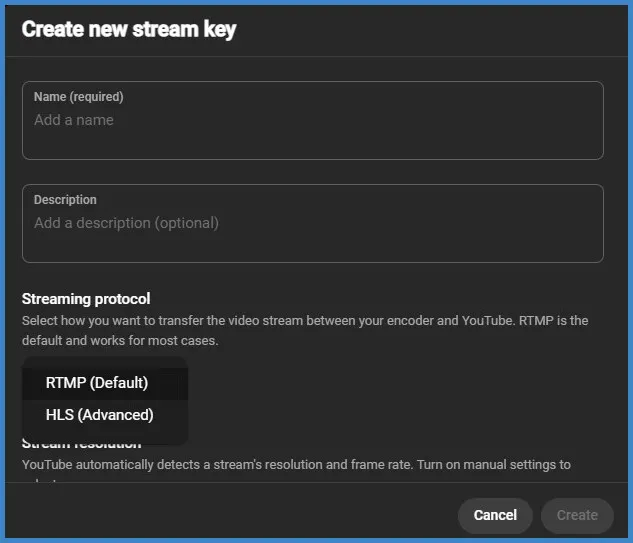
While creating a new stream key in YouTube Studio, you can see two options while selecting your streaming protocol: RTMP (Default) and HLS (Advanced).
Who This is For
- Live streamers, event producers, devs/engineers, and platform owners deciding how to ingest and deliver live video to YouTube and downstream CDNs.
- Useful for: gamers, webinar hosts, broadcast engineers, SaaS streaming teams, and anyone asking “Which protocol should I use for low latency vs scalable delivery?”
Undertanding These Protocols
- RTMP — Default / easiest for sending live video from an encoder (OBS, vMix, Wirecast) into YouTube Studio. Low setup friction, broad encoder support, good stability. Best when you need simple live ingestion and reliable performance.
- HLS — Advanced / delivery-focused. Optimized for scalable delivery (CDNs), adaptive bitrate, and modern browser playback. Choose HLS for large audiences, multi-CDN workflows, or if you require adaptive streams and advanced CDN features (DVR, LL-HLS). Not as plug-and-play for direct ingestion to YouTube Studio unless your workflow or CDN supports it.
Short Comparison Table
- Use case: RTMP = encoder → YouTube ingest. HLS = CDN delivery / VOD + adaptive bitrate.
- Latency (typical): RTMP-based ingest to YouTube → end-to-end viewer latency ~15–45s (depends on processing/YouTube settings). HLS (classic) viewer latency ~20–60s; Low-Latency HLS (LL-HLS) can approach RTMP/WebRTC latencies but requires LL support across encoder/CDN/player.
- Encoder support: RTMP = universal (OBS/vMix/FFmpeg). HLS = encoders that segment + upload or origin server.
- Adaptive bitrate: RTMP can push multiple streams; adaptive delivered via HLS manifests (M3U8). HLS = native ABR.
- Scalability: RTMP ingest + CDN (HLS) = best. HLS direct = most CDN friendly.
- Complexity: RTMP = low. HLS = higher (manifest management, segmentation, CDN config).
- Security: Both can be secured; HLS gives tokenized URLs and signed manifests commonly used by CDNs.
Why the Difference Matters
- “How do I minimize viewer latency on YouTube?” → choose RTMP ingest + encoder optimizations or investigate LL-HLS / WebRTC pipelines.
- “How can I scale to 100k viewers?” → use RTMP ingest to YouTube or origin + HLS distribution through CDN for adaptive, reliable delivery.
- “How do I support adaptive bitrate and mobile players?” → use HLS for ABR manifests and wide device compatibility.
- “How to set up reliable streaming from OBS to YouTube Studio?” → use RTMP with recommended encoder settings (keyframe, bitrate ranges).
Detailed Differences
1) Purpose & architecture
- RTMP (Real Time Messaging Protocol)
- Primarily an ingest protocol: push from local encoder to streaming platform (YouTube Studio ingest URL + stream key).
- Single persistent TCP connection; widely supported by desktop encoders.
- HLS (HTTP Live Streaming)
- Primarily a delivery format: segmented .ts/fMP4 files + manifest (M3U8) for adaptive playback via CDNs and browsers/players.
- Works over standard HTTP — highly cacheable by CDNs, ideal for large audiences and device compatibility.
2) Latency & viewer experience
- RTMP ingest tends to be used with platform-level packaging (YouTube transcodes and serves HLS/DASH to viewers). End-user latency depends on platform processing and player buffers.
- Classic HLS has higher inherent segment + playlist latency (often 15–45s+). Low-Latency HLS (LL-HLS) lowers this but needs orchestrated support (encoder segmentation, CDN and player LL support).
3) Compatibility & toolchain
- RTMP: OBS Studio, Streamlabs, vMix, FFmpeg → straightforward.
- HLS: requires encoder or packager that generates segments and manifests, or an origin server (Nginx with HLS module, Wowza, SRT/Media servers). For browser playback, HLS is natively supported on Apple devices and via players (hls.js) on others.
4) Adaptive Bitrate (ABR) & quality
- RTMP can carry a single bitrate or multiple RTMP streams per quality level. YouTube transcodes to multiple ABR renditions server-side.
- HLS is the standard for client-side ABR: manifest points to multiple renditions; players can switch quality based on bandwidth.
5) Scalability & CDN caching
- HLS excels with CDN caching (stateless HTTP segments), giving predictable scale and lower origin load.
- RTMP requires ingest endpoints and then server-side packaging; scale relies on platform/CDN architecture after ingest.
6) Reliability & firewall traversal
- RTMP uses a persistent TCP connection and can be affected by unstable networks; widely allowed on corporate networks.
- HLS uses HTTP, generally better for corporate firewalls and CDNs since it behaves like normal web traffic.
7) Security & monetization
- HLS supports signed URLs, token authentication, encrypted segments (AES), and DRM integrations more naturally.
- RTMP uses stream keys; security beyond that often implemented in the delivery layer.
Practical Recommendations & Encoder Settings
A). If you want easiest path to YouTube Live:
- Use RTMP ingest from OBS / vMix → YouTube Studio stream key.
- Recommended settings (YouTube recommended ranges):
- Keyframe interval: 2 seconds (set GOP = 2s).
- Encoder: x264 or NVENC (hardware).
- Bitrates (approx): 1080p30 = 3,000–6,000 kbps; 720p = 1,500–4,000 kbps; 480p = 500–1,500 kbps.
- Audio: AAC, 44.1–48 kHz, 128 kbps stereo.
B). If you need high scale + ABR + DVR + advanced CDN features:
- Use a packager/origin that outputs HLS (fMP4 segments + multi-variant M3U8). Push RTMP or SRT to an origin, then let the origin create HLS for CDN.
- Consider Low-Latency HLS only if your CDN and player support LL workflows.
C). For the lowest possible latency:
- Consider WebRTC or optimized LL-HLS workflows (these require more infra). RTMP alone will not achieve sub-5s at scale.
Real-World Use Cases
- “I run a gaming stream on YouTube — should I use RTMP or HLS?” → Use RTMP from OBS to YouTube Studio (simple, low friction). For huge events consider RTMP ingest + HLS CDN for global delivery.
- “I need adaptive quality for mobile viewers” → Use HLS (multi-bitrate manifests).
- “I need sub-10s latency for auctions/live bidding” → Investigate WebRTC or LL-HLS with specialized CDN partners; RTMP+YouTube may not meet sub-10s needs.
- “I want to replay and DVR the live” → HLS supports DVR windows and reliable VOD creation
Quick Decision Matrix
- Beginner / single-PC streaming to YouTube → RTMP (OBS → YouTube Studio).
- Large event / multiple CDNs / global audience → RTMP ingest to origin → HLS distribution via CDN.
- Ultra-low latency interactive app (bidding, live quizzes) → WebRTC or LL-HLS (complex infra).
- Monetization & DRM → HLS + CDN with signed URLs/DRM.
Topical Authority Signals
- Many professional live events use RTMP for encoder→platform ingest and HLS for CDN delivery because this splits responsibilities: encoder simplicity vs delivery scalability.
- In production, operators set 2s keyframes, fixed GOP, and multiple bitrate encodes to ensure smooth ABR switching downstream.
- Test on a staging stream with your target CDN and players before any large event — parity between encoder segmentation and CDN TTL/manifest settings affects latency and viewer experience.
Recommended Tools & Vendors
- Encoders: OBS Studio (free), vMix, Wirecast, FFmpeg (scriptable).
- CDN / Packagers: Akamai, Cloudflare Stream, Fastly, AWS CloudFront + MediaPackage (for HLS/LL-HLS).
- Browser + cloud option: If you prefer a browser-first pipeline, platforms like Yostream (browser-based streaming + multistream/podcast workflows) can simplify ingest and integration with YouTube while handling packaging and multistreaming. Use it if you want a low-code, browser-native workflow that reduces encoder maintenance.
- Monitoring: Use stream health dashboards (YouTube Studio health panel), CDN analytics, and SRT/RTMP monitoring tools.
FAQs
Q: Which protocol does YouTube Studio expect for live ingest?
A: YouTube Studio commonly uses RTMP ingest from desktop encoders (stream key + ingest URL). Platforms often transcode and serve HLS/DASH to viewers.
Q: Can I send HLS directly to YouTube Studio?
A: Not commonly — HLS is typically used for delivery. For production workflows, push RTMP (or SRT) to an origin that then outputs HLS for CDN delivery.
Q: How do I reduce buffering for mobile viewers?
A: Provide HLS with multiple bitrate renditions (ABR) and use a CDN to cache segments close to users.
Q: What keyframe / GOP should I use for YouTube?
A: 2 second keyframe interval is industry standard for compatibility and smooth transcoding.
Actionable Checklist Before Go-Live
- Choose RTMP for simple ingest; plan HLS only if you need ABR/CDN features.
- Set keyframe = 2s, encoder preset tuned for quality vs CPU.
- Encode multiple bitrates if you control packaging; otherwise ensure your platform transcodes.
- Verify stream key and ingest URL in YouTube Studio. Run private test stream.
- Monitor YouTube Studio health + CDN analytics during live event.
- Have a fallback (lower bitrate stream) ready if bandwidth spikes.